
Buying without watching the previous wave
Keep the reason for the purchase clear. Decide which part of the defence failed before spending on it, so the next wave becomes a way to check your idea instead of another sequence of unrelated upgrades.
The candy is worth defending. Candy Town has you place and upgrade towers against gummy invaders, with a listed hundred-wave adventure and an Endless Mode that carries the score chase beyond the main run.
SourceY8 · new tabSource pages checked: 23 November 2026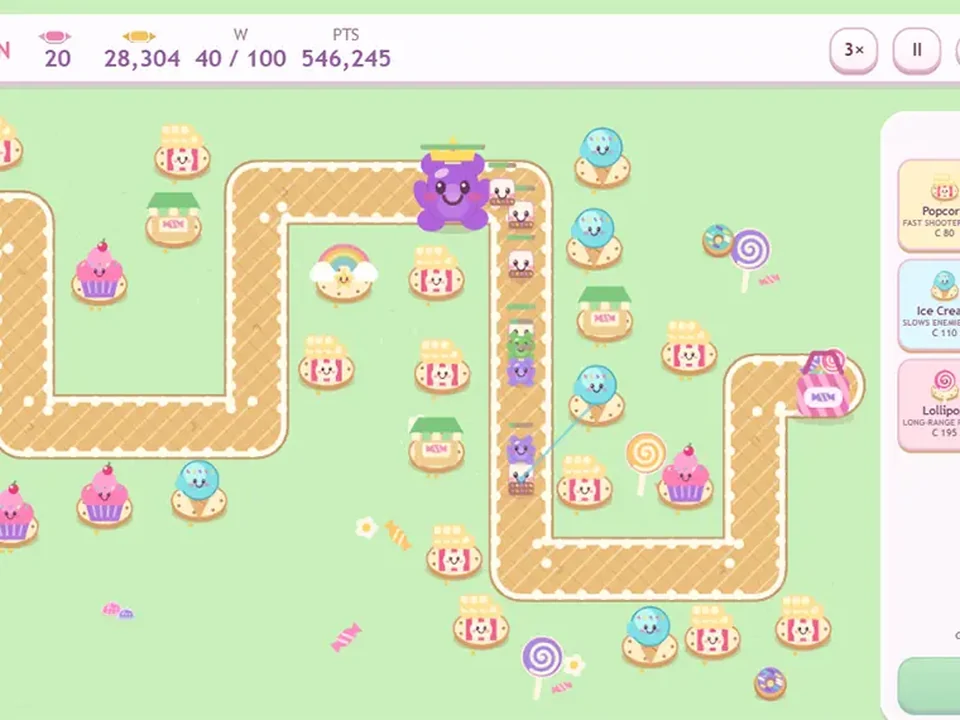
Locate the route and the wave control. Before you start sending enemies through the town, look at where they travel and which tower options the game offers, so your first placement answers a problem you can actually see.
Access: Free browser play on Y8. Account and high-score features are listed; starting requirements are not specified.
Start with the route. A useful first question is where an enemy will spend time near your chosen position, because building somewhere merely because there is room tells you little about what that tower will contribute.
Watch before buying the next change. If a group gets through, notice where the defence stops keeping up and use that observation to choose an upgrade or another placement, rather than treating every available purchase as equally helpful.
Keep the weak point in view. The gap between a plan and what enemies actually do gives you something to work with, especially when a familiar defence starts meeting a different sort of pressure.
Bosses deserve another look at the plan. The listing includes larger gummy bosses, so a setup that seems comfortable against ordinary waves is not a reason to stop checking how the next encounter changes the demand on your towers.
Know what you are speeding up. Y8 lists a speed control alongside Candy Burst and Freeze, but learning what the on-screen prompts do first makes more sense than using every option while still trying to understand the route.
There is room for a longer project here. A hundred listed waves and an Endless Mode give this selection a different shape from a single donut drop, although neither detail tells us how long your own session will last.
Keep the reason for the purchase clear. Decide which part of the defence failed before spending on it, so the next wave becomes a way to check your idea instead of another sequence of unrelated upgrades.
Choose a computer for this edition. Y8 explicitly labels Candy Town as desktop play, so the fact that another game on the same platform works on your phone is not evidence that this one will too.
The planning pick in a mostly quick-action collection. We would choose Candy Town when there is time to follow a defence through several waves, while the computer-only listing makes it a poor recommendation for someone browsing entirely on a phone.
You would rather arrange the fight than steer every attack. Thinking about placements, observing a result and changing the plan can be the satisfying part here, particularly if a direct keyboard action game is not the break you want.
Do not build your plan around unverified shortcuts. The source names several controls without giving readable key bindings, and it does not establish how progress persists, so check the game’s own menus before relying on either.
Game imagery from the linked publisher material or opening-session captures. Artwork remains with its respective owners.
No, it is tower defence. You protect the town with placed and upgraded candy towers against incoming gummy enemies, which makes its decisions closer to planning a defence than swapping sweets into matching rows.
The listing names Endless Mode. Y8 describes a hundred-wave adventure followed by continued score chasing, but it does not provide a verified completion time that would let us promise a particular length for your first run.
The listing does not settle that. Account and high-score tags point to platform features, but they are not enough to conclude that every player must register before opening the browser game itself.
Source-based guide; not a claim of a completed playthrough. Browser edition linked above. Checked 23 November 2026.
Candy Town — Y8Read the full selection notes